What it does
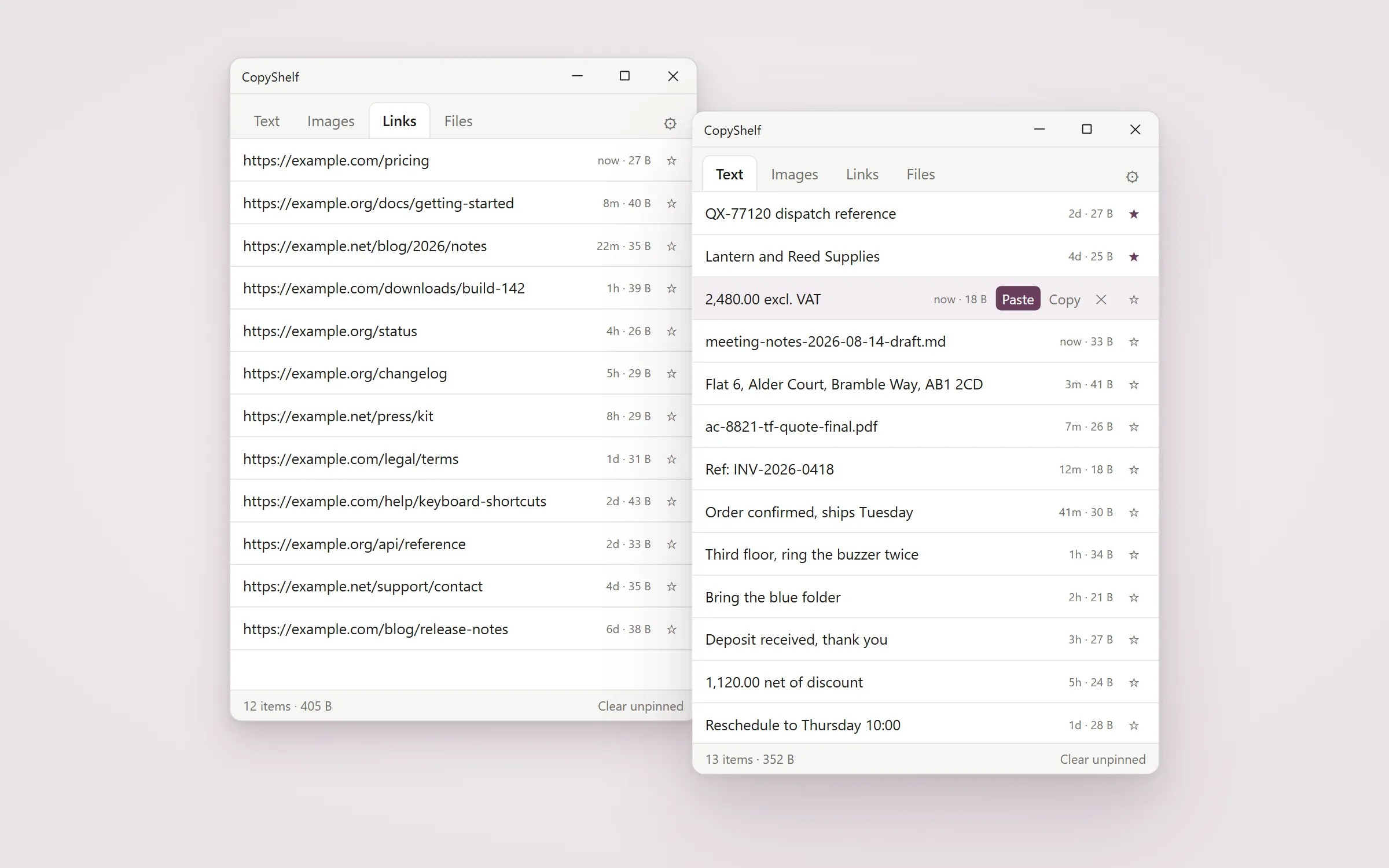
A clipboard manager that keeps text, images, links and files in four separate tabs instead of one jumbled list. You set how much each tab keeps, by item count or megabytes, and which tabs survive a restart. No account, no cloud, no telemetry.
Four tabs, not one list
Text, images, links and files each get their own tab, so a screenshot never buries the address you copied ten minutes ago. Links are separated from ordinary text automatically. Files and folders are held as files, which the clipboard built into Windows does not do at all.
You decide how much each tab keeps
Set a limit per tab by number of items, by megabytes, or neither, and choose per tab whether it survives a restart. Pin anything you want kept: a pinned item is never evicted by a limit, never taken by Clear, and never swept at restart.
It refuses what applications ask it to refuse
When a password manager or a private browsing window marks what it puts on the clipboard as excluded, CopyShelf does not store it. Three separate Windows markers are honoured, and a marker that is present but unreadable is treated as exclusion rather than ignored. One gap is the browsers': Chrome and Edge do not mark a link copied with the right-click menu, even in a private window, so CopyShelf keeps it in Links, where you can delete it.
One key brings it back
Ctrl and backtick summons the window from anywhere and dismisses it again. It is a stored preference, so it can be changed, and if the key is already taken by something else the app says so in the window instead of failing quietly.
Click to copy, double-click to paste
One click puts an item back on the clipboard. Double-click an item and it pastes into the window you were just in.
Drag it out as a real file
On Windows, drag an item out of any tab into another application. Images and files arrive as real files.
Questions
Does anything I copy leave my computer?
Nothing is sent by CopyShelf. It has no account, no server and no telemetry, and it stores what it keeps in a database in your own user folder. The privacy page carries the precise boundary, including what Windows does on its own.
What happens when I copy a password?
If the password manager marks it, and the common ones do, CopyShelf does not store it at all. A marker it cannot read is treated as do-not-store rather than ignored.
Where is my history kept?
In one database file under your own AppData folder. It is not encrypted. See the privacy page.
How is it different from the clipboard history already in Windows?
The built-in one keeps about 25 items in a single list, drops unpinned items when you restart, and does not hold files at all. CopyShelf separates the four kinds, lets you set the limits, and holds files.
Is it a subscription?
No. One payment.
Is there a macOS build?
Not yet. It is coming soon to Mac App Store.
Privacy
What it collects: Nothing. There is no account, no sign-in, no analytics and no crash reporting, and no server for any of it to reach: CopyShelf has no backend at all. What it holds is what you copied, and it holds it on your own machine. What leaves your machine: CopyShelf sends nothing. No account, no server, no telemetry, no sync - and your clipboard never leaves your machine. The Windows component that draws its window talks to Microsoft on its own account, as it does for every app on Windows built this way, and CopyShelf turns that down as far as the platform allows.
What it costs
A 30-day free trial through the Microsoft Store, then a one-time purchase.
USD 14.99 one time. No subscription.
Also from the studio
Questions or problems: support@hardboundstudio.com. A person reads every message.