
What it does
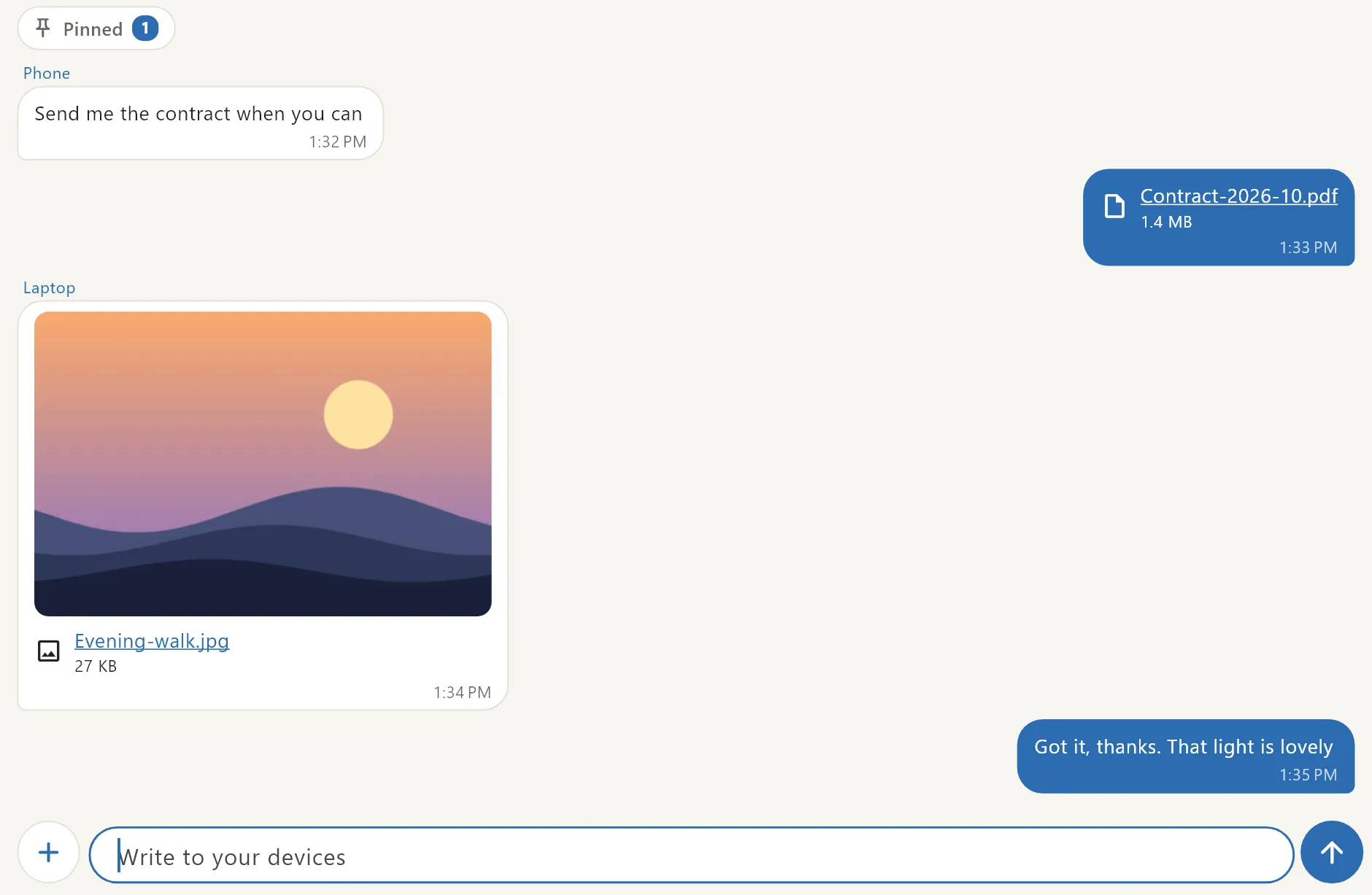
Notelocal is a private thread between your own devices on the same local network. It carries text, links and files, with no account and no server. The Windows and Mac apps are a direct download from this page, with a free trial; the iPhone and Android apps are in development.
One thread, kept on every device
Each item you send joins one thread, and each device keeps the whole history. When devices meet on the network, they exchange exactly what the other lacks, so their histories end up identical regardless of the order things arrived in.
Search the thread
A search field finds past text across the whole thread on the device.
Pair a computer by typing a short code
Two computers pair once by typing an 8-character code shown on the other. Wrong codes are refused, and after five the pairing window closes.
Encrypted links to your own devices only
Devices talk directly over TLS 1.3, with both sides' certificates pinned to the devices you paired. An unpaired device, a device you removed, or an address outside the local network is refused.
Light enough to leave running
The Windows helper waits in the notification area and opens its window only when asked. Measured on 6 October 2026 with a peer linked and about 10,000 items stored, it used a few megabytes of memory with the window closed.
Alerts when something arrives
A dot on the tray icon and a notification tell you when something arrives from another device while the window is closed. Alerts and their text can be switched off.
Questions
Does Notelocal use the internet?
It is built to work only on your local network. It has no server or account, and its own code refuses addresses outside the local network. In October 2026 its outbound connections were watched on a Windows and a Mac test build, and the only one seen on either was the paired device on the home network. A store release and the phones have not been measured yet.
Can I install it today?
Yes, on Windows 11 and Mac, from the downloads on this page. It is not on any store yet.
Which devices will it run on?
Windows 11 and Mac today. iPhone and Android are in development.
Is there an account or a subscription?
There is no account or subscription. The computer apps are a one-time purchase.
Does it show Urdu?
Notelocal displays Urdu text in Nastaliq on Windows and iPhone, while the interface itself is English.
Can I send to other people?
No. Notelocal is for one person's own devices, so it has no contacts or groups.
Is my history encrypted on disk?
No, not by Notelocal. It relies on your operating system's disk encryption and makes no claim of its own.
Does it use a browser engine?
No. Flutter's own renderer draws the window, without a WebView.
Privacy
What it collects: The studio collects nothing, because Notelocal has no backend, account, login, telemetry or online crash reporting. On your PC or Mac, in the app's data folder, Notelocal keeps the thread (text, links, file items and their details), the files themselves, the device's own key and certificate, the list of devices you paired, their last local addresses, and the helper's settings. Paired devices hold copies of the same thread. What leaves your machine: Measured on both computers in October 2026, from test builds rather than a store release. On Windows, from an installed test package, the only outbound connection seen was to the paired device on the home network, and its local-network announcements went only to the standard local multicast addresses. On a Mac, from a test build, a three-minute watch saw one remote end, the paired device on the home network, and its announcements went only to the local multicast address. A store release and the phones have not been measured, so this page makes no claim about them. By design its code refuses addresses outside the local network, and it has no server or account to reach.
Read the full Notelocal privacy pageRead the Notelocal licence agreement
What it costs
Free for 30 days on Windows and Mac, then a one-time purchase.
A one-time purchase, with no subscription.
Also from the studio
 Dictiq (opens dictiq.app in a new tab)Dictation for Windows that runs on your PC.
 LeaseRail (opens leaserail.app in a new tab)Turn a folder of tenancy contracts into clean data.
 BooksRail (opens booksrail.app in a new tab)Accounting and reporting for real estate.
 CopyShelf (opens copyshelf.app in a new tab)A clipboard manager that sorts what you copy into tabs: text, images, links and files.
 Clipverb (opens clipverb.app in a new tab)Give it a video link and it files organised Markdown notes in your vault.
 Sortbook (opens sortbook.app in a new tab)Sorts the files in the folders you choose, by the rules you set.
 Reopen (opens reopenpdf.app in a new tab)PDF to Excel and Word, with the printed totals checked.
 TBRailEight health checks for your trial balance, inside Excel.
 CapKB (opens capkb.app in a new tab)Compress images in bulk to a kilobyte limit, on your computer.
 Issue Doc (opens issuedoc.app in a new tab)Invoices and estimates on your letterhead, with the issued PDF as the record.
Questions or problems: support@hardboundstudio.com. A person reads your message.